How to Buy a Dropshipping Store: A Step-by-Step Guide for Beginners
Buy your dropshipping store the simpler way: choose a Storalo package, send your niche and target market, and get a done-for-you Shopify storefront.

Key takeaways
- Choose a Storalo ready-to-sell store to skip initial Shopify setup and focus on your launch.
- Starter is $199 for up to 10 products; Growth is $349 for up to 25; Premium is $649 for up to 50.
- Delivery takes 3, 5, or 7 days from receipt of your store information, with revisions and support included.
- You own the store fully from day one; Storalo uses only collaborator or staff access.
- Budget separately for Shopify subscription, domain, paid themes or apps, and advertising spend.
Ready to launch a professional dropshipping store without learning Shopify setup first? Buy a Storalo ready-to-sell store and put the initial build in experienced hands, with a defined package, delivery window, revisions, and support.
The simplest buying process starts with your niche, target market, and catalog size. Choose Starter, Growth, or Premium, send your store information, and review the completed storefront against your package. This guide walks through that path so you can spend less time organizing a build and more time preparing your offer and customer experience.
Should You Buy a Dropshipping Store or Build One?
Choose a Storalo ready store if you want a faster, simpler route to a professional storefront. A DIY launch adds platform learning, layout decisions, and configuration checks to your workload. The done-for-you option puts those initial tasks into a defined package while you retain full ownership from day one.
A new ready store is different from an established business with historical orders and customer records. Here, you are choosing completed setup work for your own launch. Sales still depend on products, marketing, and your effort.
For a closer look at the service, read about outsourcing a done-for-you store. Our prebuilt store value guide explains why saving setup time can make the purchase worthwhile.
| Decision factor | Storalo Ready Store | DIY setup |
|---|---|---|
| Initial work | Done for you | You handle the build and troubleshooting |
| Price | Packages from $199, one-time | Your time goes into learning and assembly |
| Delivery | 3–7 days from receipt of store information | Depends on your time and learning curve |
| Ownership | Fully yours from day one | You manage the setup yourself |
| Review | Revisions and support included | You resolve setup questions yourself |
Step 1 — Define Your Ready-Store Brief
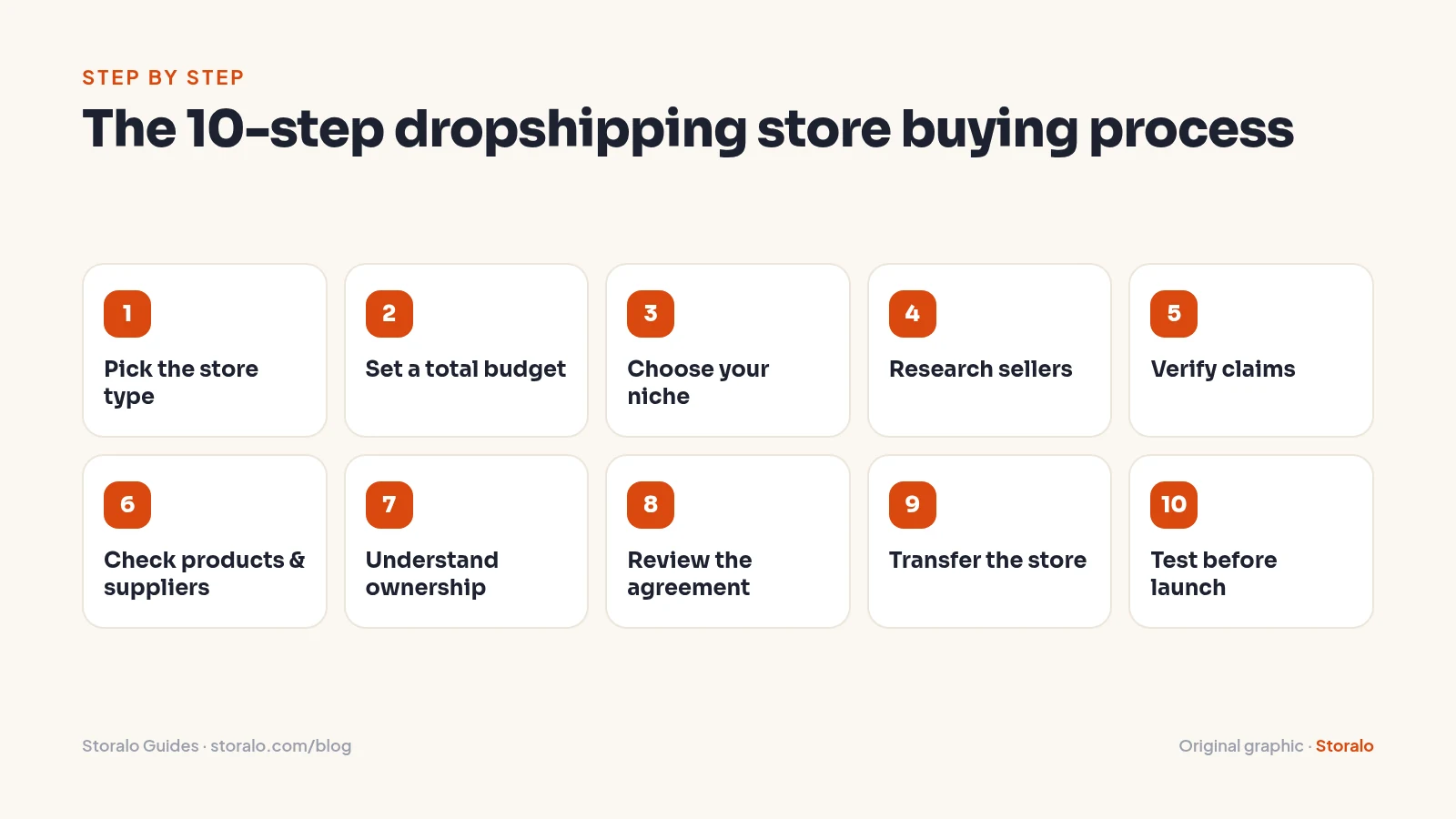
Start with three details: a store name, niche or product idea, and target market. These give Storalo the information needed to begin your store. Product and supplier links are optional; the team works from your niche otherwise. You do not need a Shopify account before ordering and will be guided through creating one.
Keep your brief practical. Describe the customers you want to serve, the type of products you plan to offer, and whether your initial range needs 10, 25, or 50 listings. If you have supplier links, include them so your information stays together. A clear brief is more useful than trying to solve every technical detail in advance.
If you are still sorting out listing terminology, our guide to stores on the market explains the difference between a ready storefront and an existing operation. For a new launch, the straightforward recommendation is to purchase a defined ready-store package.
Step 2 — Set Your Total Budget
The one-time package prices are $199 for Starter, $349 for Growth, and $649 for Premium. Choose by catalog size, presentation features, revisions, and support. This gives your setup budget a clear starting point before you consider optional extras.
Shopify subscription, domain, paid themes or apps, and advertising spend are not included. Check Shopify's published pricing for current subscription options and billing terms. Keep an operating reserve for samples, supplier payments, refunds, and other day-to-day expenses.
Optional services let you add a specific piece of preparation when it suits your plan. Ad pixel and analytics setup for Meta, TikTok, and GA4 costs $79. Product descriptions and copy pack costs $79; a logo and brand kit costs $99. Email flows covering welcome, abandoned cart, and post-purchase cost $149. Select extras around a defined need, rather than treating every add-on as essential.
Step 3 — Choose Your Niche
Choose products whose claims, sizing, shipping, and support requirements you can explain accurately. Consider damage risk, delivery expectations, return costs, and whether advertising restrictions or specialist compliance checks apply. Avoid selecting solely from the seller's trend predictions. Storalo can suggest niche directions, but the final choice is yours. Outsource construction after clarifying the customer problem, not as a substitute for that decision.
Write a sample customer question and answer it using supplier documentation. For a hypothetical pet-accessory shop, you might need material details, sizing measurements, and cleaning instructions. If those answers are unavailable, you have found a product-readiness issue before committing money.
Step 4 — Explore Storalo Demos and Package Features
Browse the 19 interactive demo stores across niches to see storefront presentation before ordering. Follow the route a customer would take: homepage, product page, and navigation. Consider which style of product presentation suits the range you want to sell.
Storalo is operated by Kygnos Media LLC and designs and sets up complete, ready-to-sell Shopify dropshipping stores. Every package includes a premium homepage, product pages, navigation setup, basic branding, trust elements, and mobile optimization. Growth and Premium expand the catalog and layout scope.
Use the premade store inspection guide to understand deliverables, then match your requirements to the package list. You can make a clear buying decision around included work instead of managing a collection of separate design and setup tasks.
Step 5 — Match the Package to Your Launch
For a focused niche test, Starter includes up to 10 products, a premium homepage, essential and policy pages, and mobile optimization. Growth is the Most Popular option and adds up to 25 products, collection setup, essential Shopify apps, advanced product page layouts, and promo sections. Premium extends the scope to up to 50 products with advanced store layout and enhanced product presentation.
Think about how customers will browse your range. A compact catalog may suit a focused idea, while collections can help organize a wider selection. Upsell/cross-sell setup and a reviews section are included in Premium. Choose those features because they fit your presentation needs, not simply because they sit in the largest package.
The FTC's advice on vetting business opportunities explains why clear services matter more than income pitches. Storalo is upfront about the setup features you are purchasing and the expenses excluded from the package.
Skip the build: Storalo delivers a ready-to-sell Shopify store in 3–7 days, counted from receipt of your store information. See the packages or browse demo stores.
Step 6 — Evaluate Products and Suppliers
Order samples and review actual tracking, product quality, packaging, and supplier support. Confirm current pricing, shipping destinations, processing expectations, stock updates, and responsibility for damaged or missing orders. A catalog integration alone is not a supplier agreement.
Confirm your own supplier access and terms before launch. Supplier connection and product import setup is available as a $99 add-on. Document how you will place orders, pay invoices, receive tracking, and resolve exceptions without using the seller's personal credentials.
For a hypothetical pet-accessory purchase, test one product with multiple size options. Compare the supplier's identifiers against the store's variants to catch mismatches that could cause incorrect fulfillment after handover.
Step 7 — Keep Ownership and Access Clear
With Storalo, you own the store fully from day one. Access is only through Shopify collaborator or staff permissions, never your password or payment details. You can outsource setup while keeping ownership separate from the access needed to do the work.
Shopify's ownership guidance explains the platform's ownership framework. This is why it is helpful to distinguish the owner role from collaborator or staff access. You are buying done-for-you setup, not agreeing to share your identity or private login details.
Keep your store records together, including your package choice, order confirmation, and any product or supplier links you provide. That gives you a simple reference for reviewing delivery and asking focused questions during your included support period.
Step 8 — Confirm Price, Timing, and Support
Know your delivery window
Starter is delivered in 3 days, Growth in 5 days, and Premium in 7 days. Timing begins on the day Storalo receives your store information. Send the store name, niche or product idea, and target market together so the build starts with a useful brief.
Express Delivery in 24–48 hours is a $99 add-on. The On-Time Delivery Guarantee returns 10% of the package price for each extra day, up to 50%. Delays caused by missing customer information or late replies do not count. Keep an eye on messages so your own responses do not hold up progress.
Choose your review allowance
Starter includes 1 revision and 7 days of support. Growth includes 2 revisions and 14 days, while Premium includes 3 revisions and 30 days. These are concrete parts of your package, so consider them alongside product capacity when deciding what fits.
Payment is securely by card through Stripe, with no account needed to place an order. Premium can be paid in two halves. Keep the one-time setup purchase separate from your Shopify subscription and other operating costs.
Step 9 — Prepare for Your Store Handover
Review against your chosen package
Use the package features as your handover checklist. Review the homepage, product pages, navigation, essential pages, and catalog count. For Growth, include collections and promo sections in that review. For Premium, also look at custom homepage sections, enhanced product presentation, and upsell/cross-sell setup.
Storalo designs every store mobile-first and checks it on phones and tablets before handover. When reviewing your store, follow the customer journey on a phone as well as a desktop. Note any questions clearly so you can make productive use of the included revisions.
Keep business decisions with you
You remain in charge of your supplier relationships, pricing, and customer-service approach. Confirm your own payment-provider requirements and business information directly through the appropriate account channels. There is no need to share your password or payment details with the setup service.
Gather feedback into a short, organized list rather than sending disconnected notes. Refer to the page, explain what you want clarified, and distinguish a requested revision from an additional feature outside your package. Extra revisions are available for $29 if needed.
Step 10 — Test Everything Before Launching
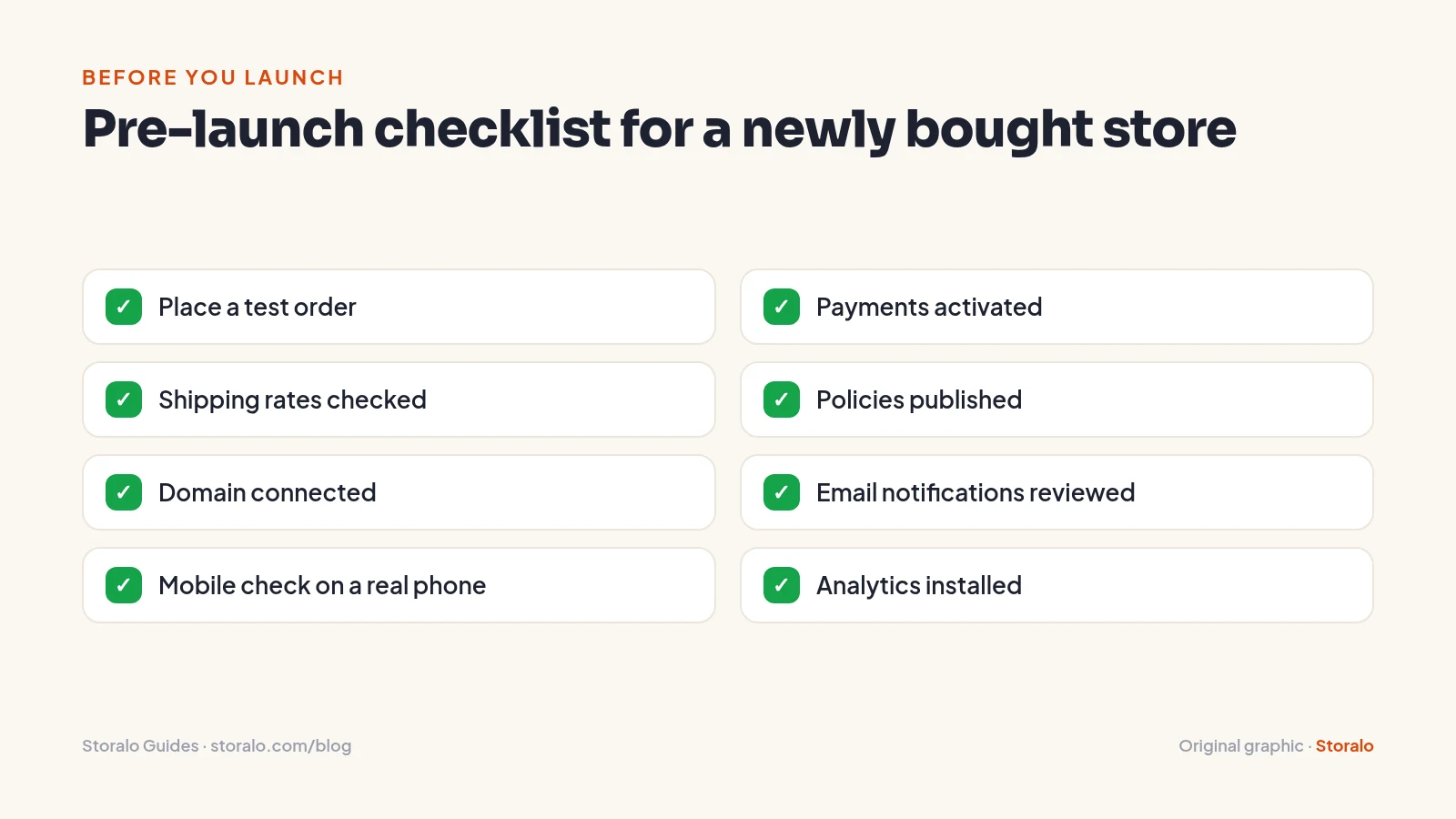
Review delivery against your selected package and use the included revision and support allowance. Storalo designs every store mobile-first and checks it on phones and tablets before handover. Use the payment provider's approved test process; confirm any live transaction testing requirements and fees first. A successful order confirmation alone does not prove funds will reach your bank.
- Verify checkout, taxes, shipping rates, and discount behavior for target locations.
- Confirm payment activation and the buyer's payout configuration.
- Match ordered variants with supplier identifiers and fulfillment instructions.
- Review customer emails, support contacts, and return instructions.
- Check domain security, mobile navigation, policy links, and analytics events.
- Test cancellation and refund workflows using appropriate test procedures.
Log defects with screenshots and expected behavior. Recheck corrections instead of accepting "fixed" in a message. If payment activation is delayed, follow the contract's delay or remediation process rather than quietly launching an incomplete checkout.
What to Do During Your First 30 Days
Days 1–7: Stabilize the handover
Review permissions, confirm billing and supplier access, and organize your customer-support information. Use your included support window to raise focused questions about the delivered setup. Keep your review tied to the package so you can identify the pages or features you want clarified.
Days 8–14: Observe real operations
Track customer questions, order exceptions, fulfillment times, refunds, and actual product costs. Investigate discrepancies promptly. Keep a simple cash calendar showing supplier payments, app bills, and expected payouts so sales do not conceal a cash shortage.
Days 15–30: Make controlled improvements
Change one significant element at a time, documenting the reason and outcome. Set a limited testing budget before running ads. Evaluate contribution after variable costs, not just revenue. A quiet first month calls for investigation, not escalating spending to recover the purchase price.
Use your package support period to address questions about the delivered work. Starter includes 7 days, Growth 14 days, and Premium 30 days. Keep your questions together and refer to specific pages so the conversation stays practical and easy to follow.
Common Buying Concerns — and How Storalo Handles Them
Worried that ordering means learning Shopify first? You do not need a Shopify account before ordering; Storalo guides you through creating one. Your starting information is a store name, niche or product idea, and target market. Product and supplier links are optional.
Concerned about losing control? You own the store fully from day one, and access is limited to collaborator or staff permissions. Concerned about an unclear timeline? Each package has a 3-, 5-, or 7-day delivery window from receipt of store information, backed by the On-Time Delivery Guarantee and its stated conditions.
If ongoing help matters, choose the included support period that suits you. The optional Care Plan provides maintenance and optimization for $49 per month, with the first 30 days free and cancellation available anytime. Its scope includes product research, ad creative, and CRO tweaks.
Frequently Asked Questions
Why choose a Storalo ready store instead of building from scratch?
Storalo handles the initial Shopify setup so you can move ahead without taking on the platform learning curve and layout work. Every package includes a premium homepage, product pages, navigation, basic branding, mobile optimization, revisions, and support. Choose the scope that matches your launch.
How much does a Storalo ready store cost?
Starter costs $199, Growth costs $349, and Premium costs $649 as one-time package prices. Shopify subscription, domain, paid themes or apps, and advertising spend are separate. Choose by catalog size and presentation needs while keeping an operating reserve.
How fast can Storalo deliver my store?
Starter is delivered in 3 days, Growth in 5 days, and Premium in 7 days, counted from receipt of your store information. Express Delivery in 24–48 hours is a $99 add-on. Missing information or late customer replies can affect timing.
What do I need before ordering?
Have a store name, niche or product idea, and target market ready. Product and supplier links are optional; Storalo works from your niche otherwise. You do not need a Shopify account before ordering, and you will be guided through creating one.
Will I own my store and need to share my password?
You own your store fully from day one. Storalo uses only Shopify collaborator or staff access, never your password or payment details. Review permissions carefully and keep ownership separate from any access granted to carry out the setup work.
What support is included after delivery?
Starter includes 1 revision and 7 days of support; Growth includes 2 revisions and 14 days; Premium includes 3 revisions and 30 days. The optional Care Plan costs $49 per month for maintenance and optimization, with the first 30 days free and cancellation available anytime.
Your Ready-Store Buying Checklist
Use this short list to move confidently from planning to ordering:
- Choose your niche or product idea and target market.
- Pick a store name and gather any optional supplier links.
- Browse the demos and select the package features you need.
- Budget separately for Shopify, domain, paid themes or apps, and ads.
- Note the delivery window, revision allowance, and support period.
- Keep ownership separate from collaborator or staff access.
- Review the delivered storefront against your selected package.
You do not need to turn these decisions into a technical build project. Choose the scope, provide your information, and let Storalo handle the initial setup.
Get Your Ready-to-Sell Store With Storalo
Choose the package that matches your initial catalog and presentation needs, rather than paying for capacity you do not need yet. Each option is a one-time setup purchase; your operating expenses remain separate.
- Starter Ready Store — $199, delivered in 3 days: Shopify store setup, premium homepage, product pages, up to 10 products, conversion-focused layout, trust elements, mobile optimization, essential and policy pages, navigation, and basic branding. Includes 1 revision and 7 days of support. Order Starter.
- Growth Ready Store — $349, delivered in 5 days: Everything in Starter, with up to 25 products, advanced product page layouts and promo sections, collection setup, and essential Shopify apps. Includes 2 revisions and 14 days of support. This is the Most Popular package. Order Growth.
- Premium Ready Store — $649, delivered in 7 days: Everything in Growth, with up to 50 products, advanced store layout, custom homepage sections, upsell/cross-sell setup, a reviews section, enhanced product presentation, and priority build. Includes 3 revisions and 30 days of support. Split payment in two halves is available. Order Premium.
Delivery timing starts when your store information is received. Express Delivery in 24–48 hours is a $99 add-on. The On-Time Delivery Guarantee returns 10% of the package price for each extra day, up to 50%; delays caused by missing customer information or late replies do not count.
To order, have a store name, niche or product idea, and target market ready. Product and supplier links are optional. You do not need a Shopify account before ordering; you will be guided through creating one. Payment is securely by card through Stripe, with no account needed to place the order.
Choose Starter for testing a niche with up to 10 products, Growth for up to 25 products plus essential apps, or Premium for up to 50 products, upsells, a reviews section, and priority build. The recommendation is simple: choose a Storalo package and let the initial setup be done for you. Start with the browse demo stores link, then order the scope that fits your launch.
Sources and references
- Shopify Pricing
- Shopify Help Center: Change or transfer ownership
- FTC Consumer Advice: Vetting a business or coaching opportunity before you buy in
Prices and platform features were checked on November 1, 2026 and can change. Cost ranges for third-party services are illustrative estimates, not quotes.
About the author: Storalo Editorial Team
The Storalo editorial team writes practical guides about Shopify, dropshipping and online store design. We check platform prices and features against official sources at the time of writing and update guides when they change. Storalo is an independent Shopify store design service and is not affiliated with Shopify Inc.